Repair shop intake process: full vs quick intake
Use this guide to choose the right check-in depth for each repair before the ticket moves to diagnosis, bench work, or pickup later.
What intake means in a repair shop
Intake is the first operating decision in the repair process. It is when staff decide how much customer, device, issue, condition, and approval detail needs to be captured before the phone leaves the counter.
Everything that happens later depends on that decision. If intake is too light, technicians lose context and front desk answers more follow-up questions. If intake is too heavy, the line slows down on repairs that did not need a long check-in at all.
A good intake step gives the front desk and the technician the same starting point inside repair ticket software for phone shops. It tells the shop what came in, what the customer reported, what condition the device was in, and what the team should verify next.
A weak intake step creates noise immediately. Staff start asking follow-up questions, technicians pause to confirm details, and checkout gets harder because the original repair context was never captured clearly.
Why repair shops end up using two intake speeds
Not every repair needs the same check-in depth. Some jobs are obvious and repeatable. Others need more explanation before the bench should touch the device.
That is why many shops naturally split intake into two paths. Full intake is for clarity. Quick intake is for speed. The real goal is not to make one flow win over the other. The goal is to match the amount of intake detail to the repair risk, customer context, and traffic at the counter.
When a shop forces every repair through a long form, the line slows down during rush periods. When a shop forces every repair through a very light check-in, technicians lose context and staff end up asking customers the same questions again later. A cleaner repair shop intake process gives staff both options and keeps the repair ticket consistent either way.
See both intake flows in a real repair workflow
These are not mock diagrams. They show how repair intake actually moves in the product, which makes the difference between full intake and quick intake easier to judge.
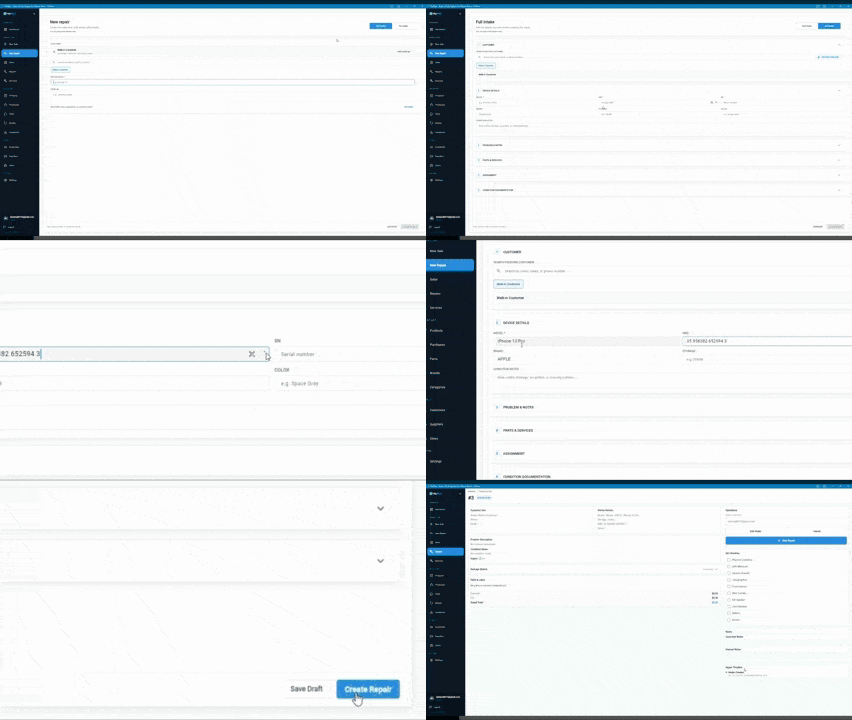
Full intake: capturing complete repair details
Full intake is used when you need detailed information. It typically includes device model and condition, detailed issue notes, customer information, and additional repair context. Full intake reduces confusion later in the process.
- Useful for complex repairs where technicians need more context before work starts
- Useful for first-time customers when history is not already attached to the job
- Useful when the issue is unclear and staff need stronger notes at check-in
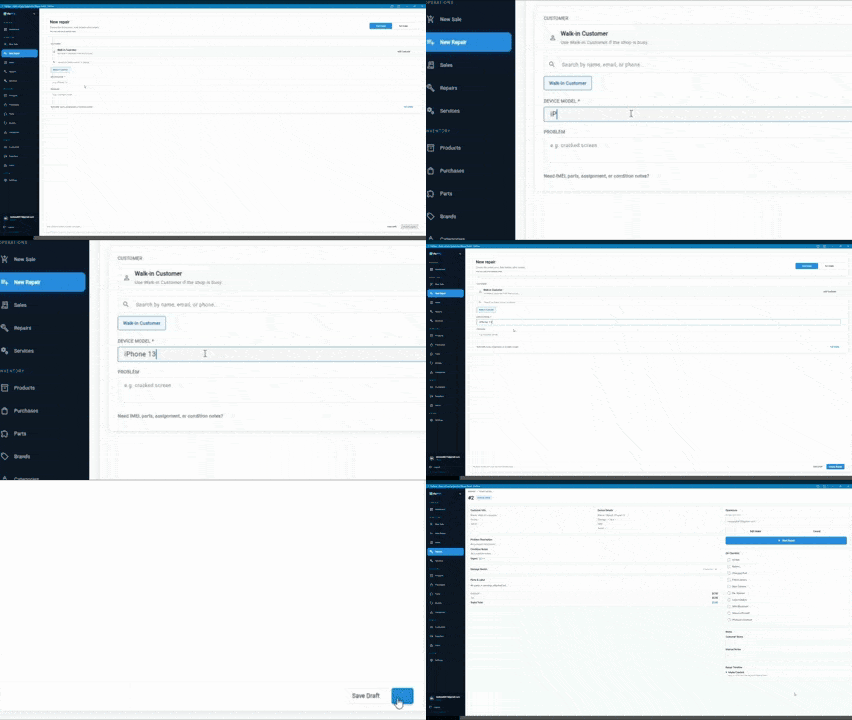
Quick intake: faster check-in for simple repairs
Quick intake is designed for speed. It captures only the essential details needed to start the repair. Quick intake reduces waiting time and keeps the workflow moving.
- Useful for simple repairs that do not need heavy intake notes
- Useful for repeat customers when the shop already has enough background
- Useful in busy shop environments where faster check-in protects the line
When to use full intake vs quick intake
Both flows can work well. The right choice depends on how much clarity the repair needs before the job moves to diagnosis or bench work.
| Feature | Full intake | Quick intake |
|---|---|---|
| Complex repair | Best fit | Usually too light |
| Simple repair | Can work, but may be more than needed | Best fit |
| First-time customer | Best fit | Usually too light |
| Repeat customer | Use when extra context is needed | Best fit |
| Busy periods | Use when detail matters more than speed | Best fit |
How staff can choose the right intake flow at the counter
The decision does not need to be complicated. Most teams can choose the right path with a short sequence of practical checks.
Step 1
Start with repair complexity
If the issue is unclear, intermittent, or likely to involve multiple parts or approval questions, full intake is usually the safer path.
Step 2
Check whether the customer is new or already known
First-time customers usually need more recorded context, while repeat customers with known history can often move through a faster repair check-in process.
Step 3
Look at queue pressure
During busy periods, quick intake protects the line for simple jobs, but staff should still switch back to full intake when the repair risk is higher.
Step 4
Make sure the ticket can still support the rest of the workflow
Even when the shop uses quick intake, the resulting repair ticket still needs enough detail for diagnosis, status updates, parts, and checkout to stay clean.
Common intake problems in repair shops
Most intake problems show up later. The front desk feels the rush first, but technicians and checkout staff pay for the missing detail after the device has already moved.
- Missing or incomplete information at check-in
- Staff asking customers the same questions again later
- Technicians unclear about the real issue or condition notes
- Missing details slowing down repairs
- Delays during repair or checkout because the ticket needs to be clarified
Why these intake problems repeat so often
Most shops do not create intake problems on purpose. The issues usually come from speed pressure, inconsistent habits, or split systems. One staff member writes strong notes. Another only records the minimum. A technician then sees different ticket quality depending on who checked the device in.
That inconsistency is what creates repeated questions later. The customer thinks they already explained the problem. The technician thinks the issue was not described clearly enough. Front desk then has to bridge the gap with more messages, more calls, and more interruptions.
The result is not only slower repair work. It also affects trust. Missing details make estimates harder to defend, handoffs harder to manage, and pickup conversations longer than they need to be.
How FixFlowSoftware handles intake differently
FixFlowSoftware supports both full intake and quick intake without turning them into separate systems or disconnected forms inside repair ticket management software.
Both flows connect directly to the repair ticket
Front desk does not have to recreate the job after check-in. The intake creates the ticket in the same workflow.
No duplicate entry
Customer, device, and issue context stay attached from intake forward, so staff are not retyping the same detail later.
No switching systems
Teams do not need one tool for check-in and another for repair tracking. Intake becomes part of the repair workflow.
What a cleaner intake process changes later in the day
When intake is captured well, the rest of the day gets easier in ways that matter operationally. Technicians can start faster because the issue and condition are already visible. Front desk can answer status questions more confidently because the ticket started with cleaner context. Pickup staff can close the repair with less reconstruction because the same record carried forward from check-in.
That is the practical difference between a repair intake form that only collects data and a repair shop intake process that actually supports workflow. The stronger process reduces repeated questions, shortens interruptions, and keeps the repair moving from intake to ticket work to checkout without changing systems in the middle. If the main pain is counter speed, start with the how to speed up repair intake guide before you decide which details can safely be shortened.
Intake connects to the full repair process
After intake, the repair ticket is already created. That means the same record can carry parts, labor, notes, status changes, and final checkout without losing context.
This is why intake quality matters so much. A clearer intake process gives the team a better start in the connected repair ticket workflow, makes the repair ticket workflow guide easier to follow in practice, and gives the how to create a repair ticket guide a cleaner starting record to standardize. If you are now evaluating software to support this policy, the repair intake software for phone shops page is the commercial next step.
See how intake works in a real workflow
Open the demo, compare the two intake paths, and see how the ticket behaves after the counter decision is made.
Related workflows
Repair intake software for phone shops
Use the commercial page if you are evaluating software specifically to improve intake speed and quality.
How to speed up repair intake
Reduce check-in time without weakening the repair record your team still needs later.
Condition notes for phone repair intake
Use stronger condition notes when drop-off disputes or bench confusion start at intake.
Customer approval workflow for phone repair
Tighten estimate and authorization handling before the repair leaves the counter.
How to create a repair ticket
Use the intake checklist guide to standardize what the counter captures before the device reaches the queue.
Frequently Asked Questions
What is a repair shop intake process?
It is the rule set a repair shop uses to decide what detail gets captured at check-in before a repair enters the active queue.
When should a shop use quick intake?
Use quick intake for simple repairs, repeat issues, or busy counter periods where the job is low risk and the team already knows what must still be captured.
When is full intake the safer choice?
Full intake is safer when the repair is unclear, the customer is new, condition notes matter, or approval and estimate questions need to be visible before the phone reaches the bench.